本文可被看做用Markdown写文档的基础教程。
#例
常常会有整理文档的需求,以前都是用Word,排版麻烦,发给别人的时候可能还有兼容问题。Markdown作为纯文本,源文件清晰明了,也可以轻松地转成pdf/ppt/html等其他格式。
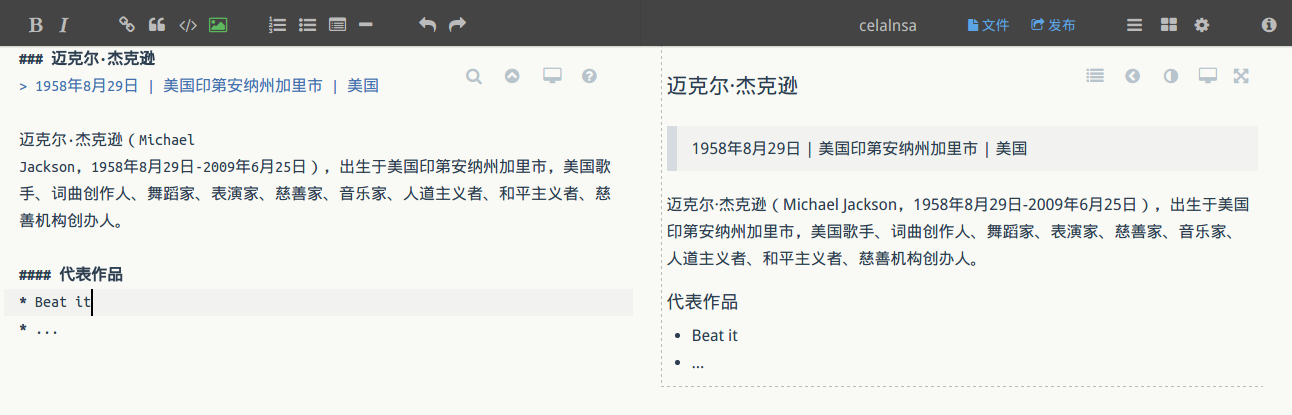
入门的话推荐用网页版如https://zybuluo.com/mdeditor先体验下,下图是一个简单的例子。
#语法
#标题层次
1 | # 一级标题 |
#有序列表
1 | 1. aaa |
- aaa
- bbb
- ccc
#无序列表
1 | * aaa |
- aaa
- bbb
- ccc
#引用
1 | > Mr.High is getting higher. |
Mr.High is getting higher.
#链接
1 | [绘制图表](https://github.com/adrai/flowchart.js) |
#图片
1 |  |
#字体
1 | **粗体** |
粗体
斜体
删除线
我是华文彩云
color=gray
color=#0099ff size=5 face=“黑体”
#表格
1 | | Tables | Are | Cool | |
| Tables | Are | Cool |
|---|---|---|
| col 3 is | right-aligned | $1600 |
| col 2 is | centered | $12 |
| zebra stripes | are neat | $1 |
#代码
1 | 行内代码用一对`包裹 |
like this print 'hello world'
代码块用一对```包裹:
```
def hello():
print ‘hello world’
```
1 | def hello(): |
#公式
用$$包裹LaTeX公式:
1 | $e^{\imath x} = \cos{x} + \imath\sin{x}$ |
$e^{\imath x} = \cos{x} + \imath\sin{x}$